DocFetcher is a great multi-OS application for searching through vast tranches of your files
DocFetcher is a free and open source application available for Windows, Linux and macOS operating systems that lets you search the contents of the files you have on your computer. What’s great about it is its search speed and comprehensiveness. You have to let it build an index of the files you want it to search, but once that’s done you can search through massive hauls of any compatible docs.
I tried it out on the whopping archive of Epstein related files the US Government released a while ago - vast number of large PDFs, hundred of gigabytes - and it worked a treat. Indexing them took ages, best left overnight, or over several nights. But the resulting search was perfectly fast and comprehensive enough for interactive use.
Here’s a screenshot from its official site:
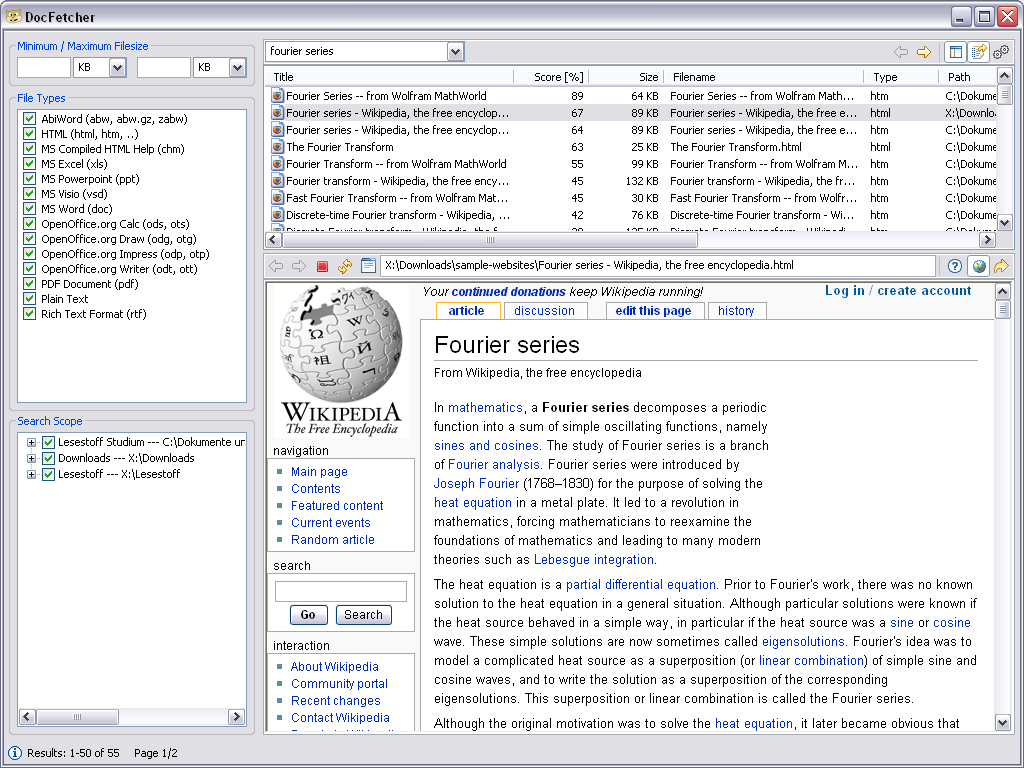
It can search through a wide variety of files. To quote:
- Microsoft Office (doc, xls, ppt)
- Microsoft Office 2007 and newer (docx, xlsx, pptx, docm, xlsm, pptm)
- Microsoft Outlook (pst)
- OpenOffice.org (odt, ods, odg, odp, ott, ots, otg, otp)
- Portable Document Format (pdf)
- EPUB (epub)
- HTML (html, xhtml, …)
- TXT and other plain text formats (customizable)
- Rich Text Format (rtf)
- AbiWord (abw, abw.gz, zabw)
- Microsoft Compiled HTML Help (chm)
- MP3 Metadata (mp3)
- FLAC Metadata (flac)
- JPEG Exif Metadata (jpg, jpeg)
- Microsoft Visio (vsd)
- Scalable Vector Graphics (svg)
I also enjoy that the first point the creator mentions when discussing their design philosophy is that it is “crap free”.
It’s potentially marginally less friendly to set up than some applications that claim to do similar things. But an average user should get on with it well. You will need a bit of extra disk space for the index which can be of substantial size, but obviously still substantially smaller than the source files you’re searching. The resulting search speed and scope is well worth the indexing, as is the way it immediately shows a snippet of the actual line in the document where your search term is found to give you the context up front.
The one slightly fiddly thing I did adjust in my version was the amount of RAM it is permitted to allow. By default it’ll only use some relatively small amount, I forget whether it was 512mb or 1gb. But there are ways to configure it to use much more. I think I upped it to 4 or 8gb when testing indexing the big tranche of Epstein files. The in-app doc tells you how - it’s basically either overwriting one file with another or editing a configuration file.
Once indexed, the search syntax comes from Apache Lucene, which means as well as simple Google-style searches (“dog”, “dog OR cat”) you can come up with constructs like “words similar to dog”, “dog but it needs to be within 10 words of cat” or “the document title should contain dog or cat but dog is more important”. The software’s documentation on this is here, and the Apache Lucene docs themselves are here.
The free version of the software is considered “legacy” and no longer updated. However, it still works just fine on modern operating systems. There is a newer closed-source “pro” version of the software should you need a more or more up-to-date features or just want to financially support the software - although I have found the free version features perfectly fine for my use cases.
The Pro version has apparently got better text extraction abilities though so I would consider it for any project for which that would be important. It’s a one-time cost of 40 euros which I think is perfectly reasonable for folk in a position to pay.